

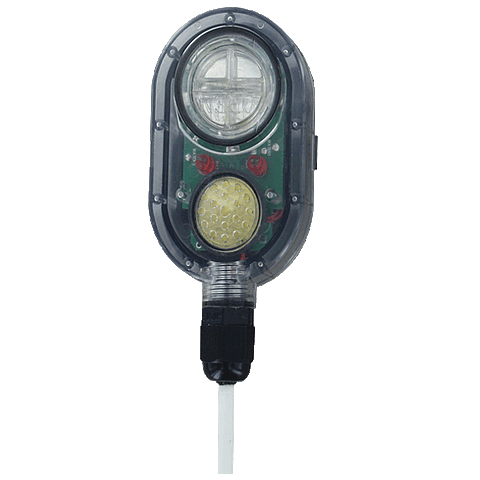
The battery-powered leak detector connects to Packet Power’s E306 environmental monitor using a 2 meter cable that can be extended up to 15 meters. When the leak detector senses the presence of water or other similarly conductive liquids, it reports the condition to Packet Power’s EMX monitoring application or to any DCIM or BMS system that supports open protocols such as Ethernet/IP, SNMP, Modbus, BACnet/IP, and MQTT.
Mounting
The probe mounts horizontally using an adjustable mounting bracket that allows detection from 1/32 inch up to 17/32 inch. The side tabs on the water detector fit into the slots on the mounting bracket.
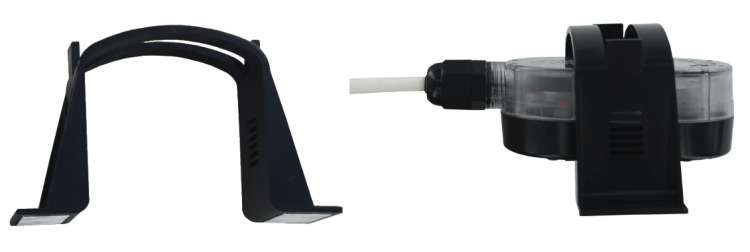
The mounting bracket can be attached to a drip pan or any flat surface using either the attached adhesive strips or two #6 or #8 screws.
Notice: Attach the probe to the mounting bracket before attaching the mounting bracket to the desired surface. The adhesive is very strong and not easily removed once attached.
Specifications
|
Service |
Water or conductive fluids |
|---|---|
|
Minimum Sensing Gap |
1/32" |
|
Switch Type |
SPST NO SSR |
|
Electrical Ratings |
Pilot duty rating 250 mA @ 24 VDC |
|
Audible Alarm |
At least 85 dB at 1 ft (0.3 m) distance |
|
Visual Alarm |
Red LED for water level
|
|
Temperature Limits |
32 to 122°F (0 to 50°C) |
|
Power Requirements |
3V CR2450 lithium metal battery, installed and user-replaceable |
|
Power Consumption |
0.9 mA steady state / 3.0 mA during alarm condition |
|
Battery Life |
5 years steady state / 48 hours during alarm condition |
|
Enclosure Material |
ABS and polycarbonate, flammability classification UL 94 V-0 |
|
Enclosure Rating |
Watertight up to 3/4 of the body height |
|
Size |
105 mm (L) x 51 mm (W) x 30 mm (H) |
|
Weight |
4.85 oz (137.5 g) |
|
Agency Approvals |
CE, RoHS |
Replacing Batteries
When the battery is low, the yellow warning LED will begin to flash and an audible alarm will sound every 300 seconds to indicate that it is time to replace the battery.
-
Using a large flat‑head screwdriver, turn the battery cover 1/4 turn in the direction of the arrows on the cover.
-
Lift and remove the battery cover.
-
Remove the coin cell battery from its compartment.
-
Insert a new 3 V CR2450 coin cell battery into the compartment with the positive (+) side facing up.
-
Replace the battery cover.
-
Using the large flat‑head screwdriver, turn the cover 1/4 turn in the opposite direction of the arrows on the cover until it is fully closed.
Operation
-
After mounting, connect the probe to any Packet Power environmental monitor that supports external probes. The leak detector can co‑exist with temperature monitoring probes on the same monitor.
-
Once connected, the probe is ready for operation.
-
Water is detected when it bridges the two conducting strips on the bottom of the unit.
-
When water is detected:
-
The relay contact closes.
-
The red LED begins to flash.
-
An audible alarm begins to chirp and will continue until the water bridge between the conducting strips is removed (for example, by evaporation or cleaning).
-
-
Once the water is no longer present, the relay contacts return to their normal state, the red LED turns off, and the audible alarm stops.
LED Indicators
-
Yellow LED: On when a low‑battery condition is detected.
-
Red LED: On when water is detected.
Interfacing with a Wireless Monitor
The leak detector interfaces with Packet Power environmental monitors that have external probe ports. The leak detector is equipped with a two‑wire connector that can be plugged into any external probe port on a compatible wireless environmental monitor.
Modbus Interface
To acquire the status of the leak detector via Modbus TCP/IP, you must use a Gateway (version 4 / EG4) that is licensed for Modbus TCP/IP.
Modbus register maps and example expressions for the leak detector are available here:
Modbus Register Maps