

The BACnet interface monitors the recency of exported data endpoints. If a specific field or object stops receiving updates from its source, the system automatically flags the data as stale and updates its BACnet reliability status.
The 30-Minute Timeout Rule
-
Normal Operation: As long as data refreshes regularly, the object's
Reliabilityproperty remains0: no-fault-detected -
Timeout Trigger: If incoming data has not been updated for over 30 minutes, a communication timeout is triggered.
-
Reliability Change: The
Reliabilityproperty of the affected BACnet object will automatically transition to12: communication-failure. -
Date-Time Accuracy: If multiple gateways are being used, it is critical that all E4 devices have NTP set up and clocks are in sync. Otherwise, it is possible to have inaccurate reliability values.
Viewing Reliability in YABE (Yet Another BACnet Explorer)
For information on using YABE with an E4 see: BACnet - Basic Data Retrieval using YABE
When troubleshooting a stale point using YABE, you can verify this state by inspecting the object's property list:
-
Locate the Device & Object: Navigate within the YABE device tree to the specific BACnet endpoint/object.
-
Check the Present_Value: During a communication failure, the
Present_Valueproperty WILL hold its last known value, but it should be treated as invalid. -
Verify the Reliability Property: Look for the
Reliabilityproperty in the attributes pane. Instead of the typical green or normal status, YABE will display:
Reliability: 12: communication-failure
Once valid data is successfully received, the Reliability property will automatically revert back to 0: no-fault-detected, and the point will resume normal operations.
Quick Reference Table
|
Data Condition |
|
YABE Display State |
|---|---|---|
|
Last update <30 minutes ago |
|
Normal / Healthy 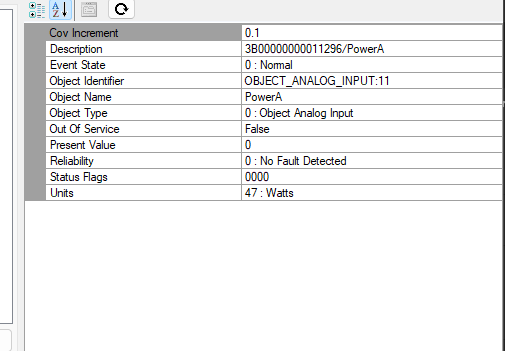
|
|
Last update >30 minutes ago |
|
Fault / Timeout Warning 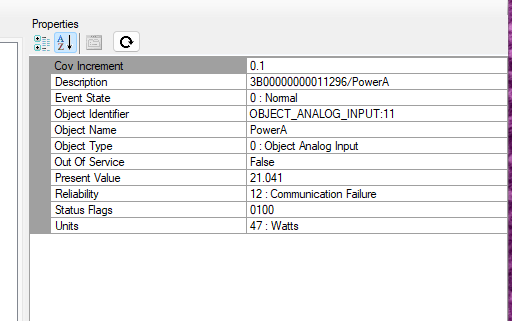
|